Deployments
The Deployments screen is the last step of the chain. Once the definition, the pipeline and the mapping are all snapshotted, assigning the mapping to an agent is what puts them to work.

The screen lists your agents. Each row shows the mapping currently assigned to that
agent, or -- Unassigned --.
1. Assigning a mapping
-
Click Assign on the agent’s row. On an agent that already has one, the button reads Change.
-
Choose the AGENT MAPPING DOCUMENT and the MAPPING VERSION.
-
Click Assign to Agent.
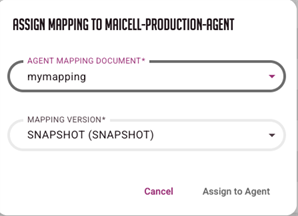
|
Only Snapshot and Release versions are listed. A Draft never leaves the Studio — see Analyze concepts. An agent runs one mapping at a time, so assigning a new one replaces whatever was assigned before. |
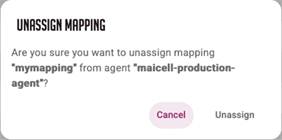
To remove a mapping, click the broken-link icon next to the Change button. It carries no label, only the tooltip Unassign mapping, and it asks you to confirm before it unassigns.
2. Keeping the agent up to date
You do not have to re-assign after editing a mapping or a pipeline. Promoting either to Snapshot asks an agent to fetch the new configuration. The Studio pushes nothing: it asks the agent to come and collect the configuration itself, so the agent has to be connected for anything to happen.
|
Only a promotion to Snapshot triggers this. Promoting to Release does not, and neither does any other edit. The agent asked is the one you have selected in the Studio, not the agent the mapping is assigned to. If you promote a snapshot while a different agent is selected, the assigned agent is never asked at all. |
Assigning and unassigning a mapping are the exception: those two ask the agent on the row you acted on, so they always reach the right one.
|
The Studio does not wait for the agent to confirm, and does not report a failure. So if the agent is offline or unreachable, the promotion still reports success while the agent carries on running the previous configuration. The only other moment an agent fetches its configuration is when it reconnects: it picks up the current configuration about ten seconds later. There is no periodic poll, so an agent that misses a sync and does not reconnect keeps running the old configuration indefinitely, and nothing on this screen says so. If results look stale, check that the agent is connected. |