MCP Gateway Service
1. Overview
The MCP Gateway Service allows the user to connect and activate any external MCP Server at any time using this component in a Flow’s Services.
The MCP Gateway can connect to any MCP Server that either supports SSE or Streamable HTTP protocols. It can connect to either a specific TOOL or RESOURCE on this external MCP Server by specification of its name.
When dealing with Tools it is possible to specify 0 or more Tool Parameters. Each Tool Parameter can have a name and a value, either from CONSTANT value or from HEADER value, in which case the Header containing the correct value can be specified.
In the table below, you will find an explanation of these properties. All attributes with a '*' are mandatory.
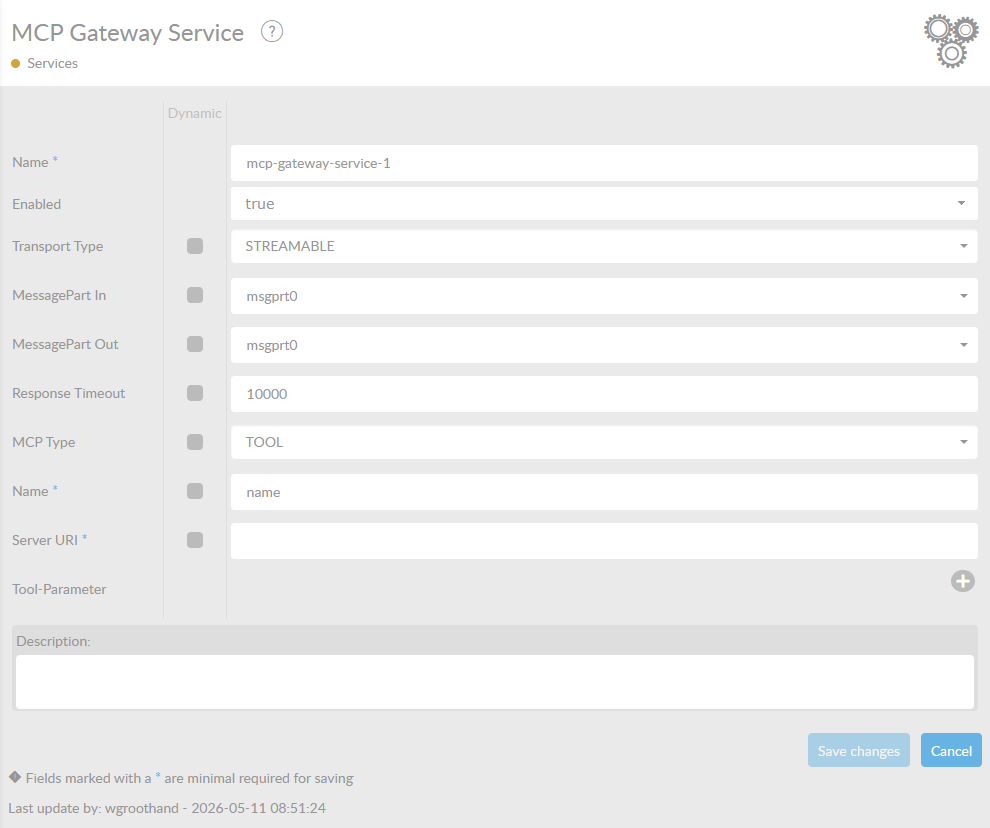
| Attribute | Description |
|---|---|
Name* |
By default, we fill this out with the technical 'tag', followed by a serial number. Changing the name is optional. |
Enabled |
Set this value to true, if you want this service to be enabled. |
Transport Type |
Defines the transport type of the MCP Client. Can be set to either SSE (Server Sent Events) or Streamable HTTP. |
MessagePart Out |
Name of the MessagePart in a ConnectMessage where the content of the file is being stored. |
Response Timeout |
Time in milliseconds to wait before time-out. |
MCP Type |
Specify whether to connect to the external MCP Server’s TOOL or RESOURCE. |
Name* |
Specify the name of the TOOL or RESOURCE. |
Server URI* |
Specify the URI for which MCP Server to connect to. |
Tool Parameters |
For every external tool there is the option to specify one or more tool-parameters. Each parameter can be specified by a name and a value. The value can be expressed as a CONSTANT value or from HEADER. |
Parameter Name* |
This will specify the name of the Parameter that needs to be populated. |
Parameter Source Type* |
Specify how to populate the parameter, either through CONSTANT value or HEADER. |
Parameter Value |
Specify a CONSTANT value when choosing CONSTANT as the Parameter Source Type. |
Parameter Value from Header |
Specify a HEADER name when choosing HEADER as the Parameter Source Type. This HEADER should exist and contain the value for this parameter. |