AS2 Gateway
1. Overview
|
AS2 stands for Applicability Statement 2. |
AS2 ( Applicability Statement 2 ) is a specification about how to transport structured business-to-business data securely and reliably over the internet. Security is achieved by using digital certificates and encryption.
The AS2 gateway allows you to send messages to AS2 trading partners over HTTP and HTTPS requesting a receipt as proof of the transaction.
These components can optionally encrypt and sign messages, supporting various encryption and message signing schemes. AS2 trading partners can thus exchange data with the AS2 gateway ensuring both confidentiality, authenticity, and data integrity. The certificates required for these operations are stored in the ConnectPlaza® key- and truststore which can be managed in the Deploy tab of the ConnectPlaza® frontend. There is also the option of including the public key in the message.
The gateway and sender can construct AS2 messages from various ConnectMessagePart payload types, i.e. text, binary, and XML payloads. In the case of a text payload, there is also the option of choosing a custom encoding. Furthermore, various message headers can be copied from the connectMessagePart to the AS2 message.
Please note that although the AS2 protocol allows for the sending and receiving of asynchronous MDNs, this is not supported by the current implementation.
The main difference between an AS2 sender and AS2 gateway is that the gateway allows you to package the receipt into a separate ConnectMessagePart. The sender simply throws the receipt away or just not requests it at all.
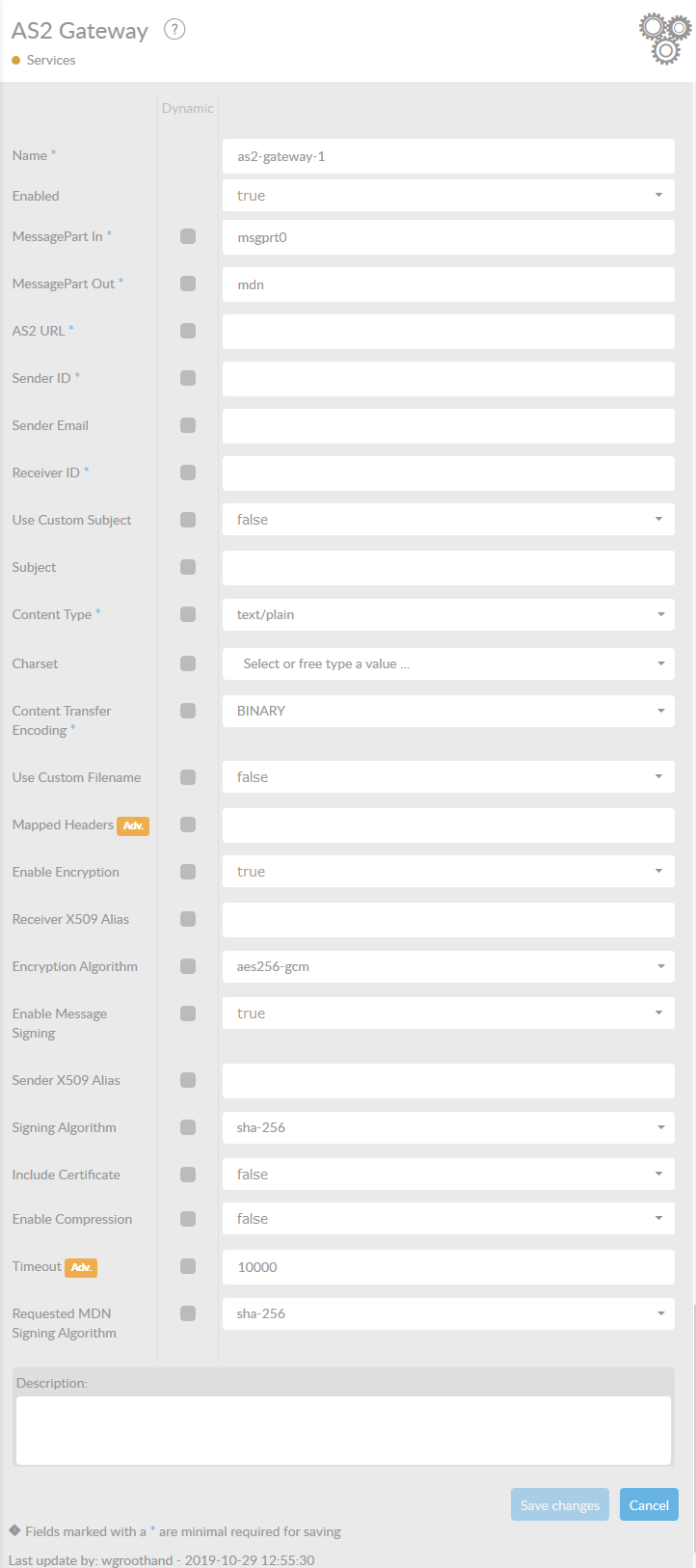
In the table below, you will find an explanation of these properties.
All attributes with a '*' are mandatory.
| Attribute | Description |
|---|---|
Name* |
By default, we fill this out with the technical tag, followed by a serial number. Changing the name is optional. |
Enabled |
Set this value to true, if you want this service to be enabled. |
MessagePart In* |
Name of the MessagePart in a ConnectMessage where the message payload to be sent is stored. Does not support ALL or ALL-XML values. |
MessagePart Out* |
Name of the MessagePart in a ConnectMessage where the MDN is stored. |
AS2 URL* |
The AS2 URL to send the AS2 message to. This should have the form |
sender ID* |
The AS2 ID of the AS2 sender. |
sender Email |
The email address of the AS2 sender. Note that this is used to set the From and Disposition-Notification-To headers but mostly does not have any great significance. It defaults to the value of sender ID (so it does not have to be an email address). |
Receiver ID* |
The AS2 ID of the receiving AS2 partner. |
Use Custom Subject |
Should a custom subject be used? If a custom subject is not used, you can specify a default subject that is the same for all messages. |
Subject |
Condition - Use Custom Subject = false The subject of the AS2 message. |
Custom Subject Header |
Condition - Use Custom Subject = true The name of the ConnectMessagePart header that contains the subject of the AS2 message. |
Content Type |
The value of the content-type header. Besides the values in the drop-down you can also specify other MIME-Types. |
Charset |
The canonical name of the Java charset set to decode the AS2 message payload. If left empty, it defaults to the system default. Besides the values in the drop down, you can also use other charset values. Consult your Java documentation for supported encodings. |
Content Transfer Encoding* |
The content transfer encoding. |
Use Custom Filename |
Should a custom filename be used? The filename gets added to the Content-Disposition header in the AS2 message. If a custom filename is not used, one is automatically generated based on an epoch timestamp and a random UUID. |
Use Custom Filename Header |
Condition - use Custom Filename = true The name of the ConnectMessagePart header that contains the filename. |
Mapped Headers |
A comma separated list of headers to be mapped from the ConnectMessagePart to the AS2 message. |
Enable Encryption |
Should encryption be enabled. |
Receiver X509 Alias |
Condition - Enable Encryption = true The alias used to retrieve the AS2 partner’s public key from the keystore. |
Encryption Algorithm |
Condition - Enable Encryption = true The encryption algorithm to be used. Note that this is independent of encryption happening at the TLS/SSL layer. |
Enable Message Signing |
Should message signing be enabled? |
Sender Key Pair Alias |
Condition - Enable Signing = true The alias used to retrieve the AS2 sender’s private and public key from the keystore. |
Signing Algorithm |
Condition - Enable Signing = true Signing algorithm to be used. Note that the old algorithm names (without the '-') are also included. |
Include Certificate |
Condition - Enable Signing = true Indicates whether the certificate used for signing should be part of the signed content. |
Enable Compression |
Should zlib compression be enabled? Note that this requires a RFC 5402 compliant AS2 receiver. |
Compress Before Signing |
Condition - Enable Compression = true Should a message be compressed before or after signing? Note that RFC 5402 compliant implementations should support both modes. |
Time-out |
Time-out for receiving MDN in milliseconds. |
Requested MDN Signing Algorithm |
Requested MDN signing algorithm. Note that the old algorithm names (without the '-') are also included. |
Description |
Description of the specific service. This is for documentation purposes. |