Progress OpenEdge pickup
1. Overview
This consumer is used to call a Progress OpenEdge procedure. This consumer can poll for messages.
Calling the procedure is based on a built-in timer. The called procedure has no input parameters and one or more LONGCHAR output parameter(s).
If a procedure needs to be called with an input parameter and an output parameter, you should use the OpenEdge Gateway .
The output parameter will be stored in the ConnectMessage as a string MessagePart with the MessagePart_name as its part-name.
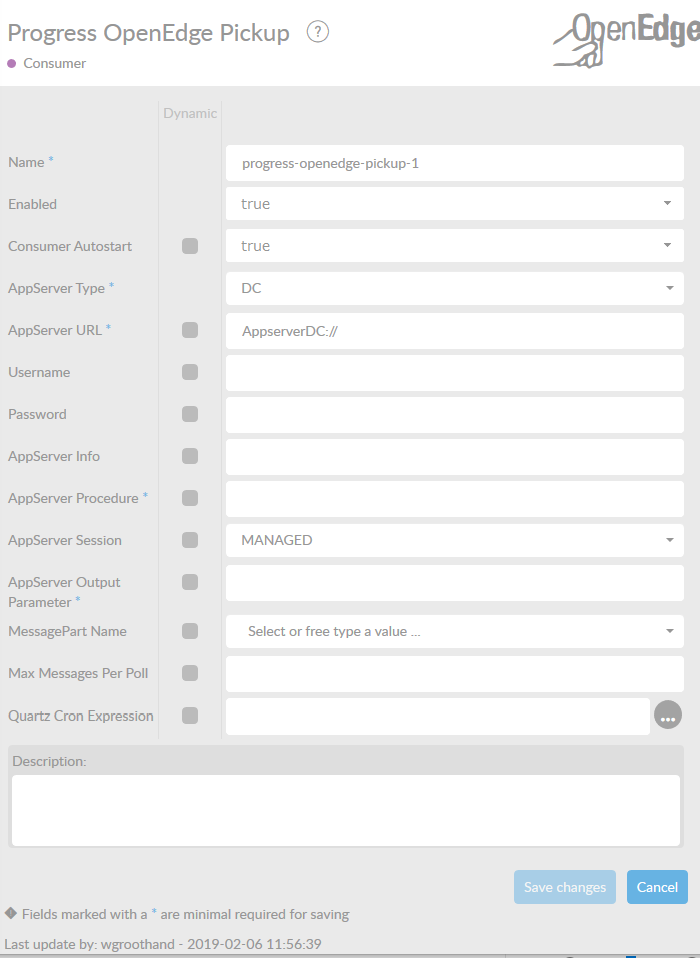
In the table below, you will find an explanation of these properties.
All attributes with a * are mandatory.
| Attribute | Description |
|---|---|
Name* |
By default, we fill this out with the technical tag, followed by a serial number. Changing the name is optional. |
Enabled |
Set this value to true, if you want this consumer to be enabled. |
Consumer Autostart |
Consumer will be started at startup of the interface. |
AppServer Type |
*Set the type for your AppServer here. The following types are allowed: * DC, for AppServerDC * DCS, for secure AppServerDCS * Pacific, for PASOE Server * Pacific Secure, for secure PASOE Server **When selecting this type, the correct URL will be entered in the fieldAppServer URL. |
AppServer URL* |
URL to connect to the Progress AppServer. |
Username* |
AppServer username. |
Password* |
AppServer password. |
AppServer Info |
AppServer info. |
AppServer Procedure* |
Name and path of Progress procedure. |
AppServer Session |
Choose AppServer session type, which can be free or managed . Depending on your appserver settings. |
AppServer Output Parameter* |
Name of OUTPUT parameter of called procedure. This must be the same name as the output parameter name in the progress procedure. |
MessagePart Name |
Name of the MessagePart in a ConnectMessage where the content of the file is being stored. |
Max Messages Per Poll |
Number of messages being handled per poll. For example if max-messages-per-poll l is set to 5 and the timer to every 10 seconds a maximum of 5 messages every 10 seconds is handled. If set to -1 all messages available are handled per timer interval. |
Quartz Cron Expression |
Definition of the interval this polling consumer will check for messages. Cron format */30 * * * * * (sec) (min) (hour) (day) (month) (year). The default is 30 seconds. |
Description |
Description of the specific consumer. This is for documentation purposes. |