Unzip service
1. Overview
This service is used to UNZIP a byte array message part, containing the bytes for a ZIP file. The zip file can be read using a regular File Consumer with the output type set to BYTES. The output of the UNZIP service will be stored inside one or more message parts depending on the number of files inside the ZIP file.
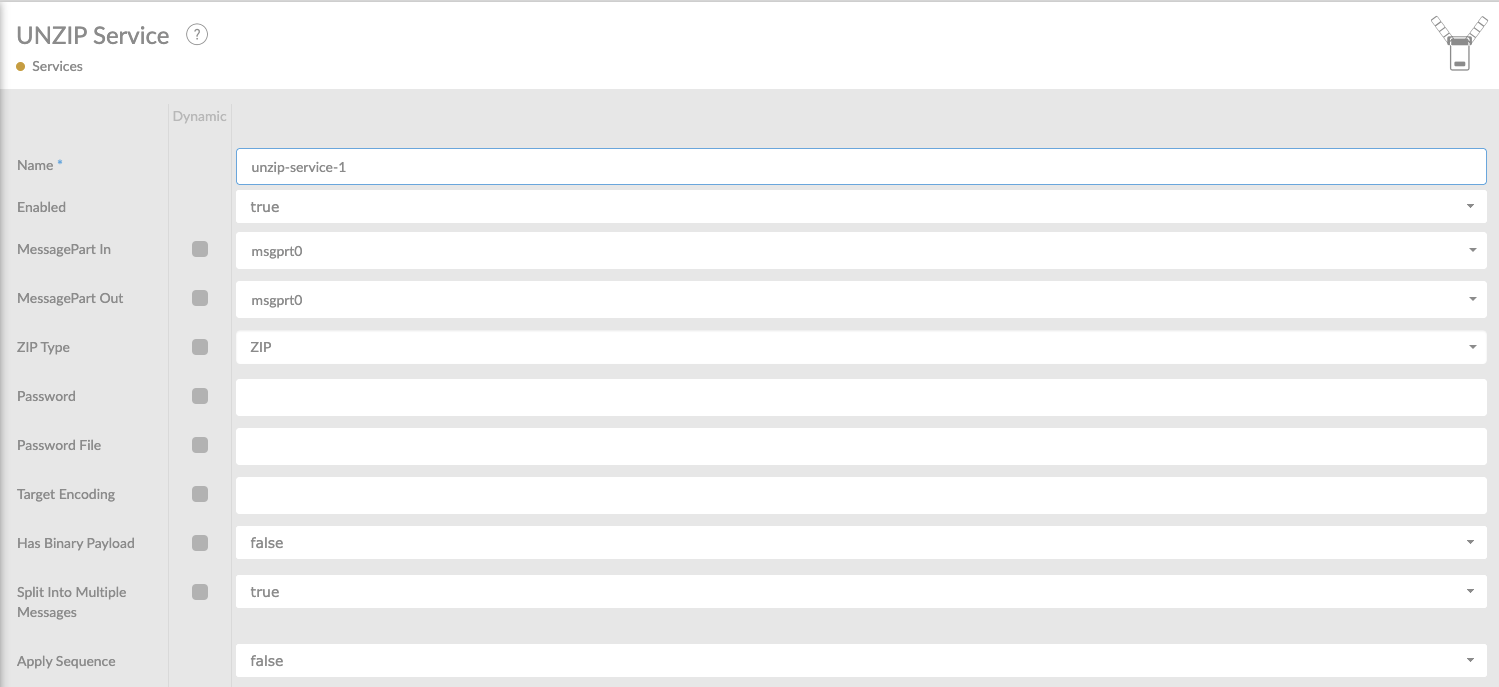
In the table below, you will find an explanation of these properties.
All attributes with a * are mandatory.
| Attribute | Description |
|---|---|
Name* |
By default, we fill this out with the technical tag, followed by a serial number. Changing the name is optional. |
Enabled |
Set this value to true, if you want this service to be enabled. |
MessagePart-In |
In this property you can define the name for the MessagePart in the Message, which will be used for the response. In this MessagePart, thevalue of the param-out parameter will be set before sending the message to the Services. The default value is msgprt0 . When using the ZIP format, you can use ALL as the MessagePart-In option. If you do that, UNZIP will export all filenames as described in the ZIP file. |
MessagePart-Out |
This is the name of the MessagePart from the ConnectMessage, which content is written to the file. If ALL-XML is entered here, the entire ConnectMessage is written to the file. By default, the name msgprt0 will be used. |
ZIP Type |
Choose between the ziptypes ZIP or GZIP. |
ZIP File Password |
The password of the zipfile, emtpy when no password is required. |
Target Encoding |
Specify the encoding for the target files. Think of ISO-8859-1 or UTF-8. |
Has Binary Payload |
Set to True , if the zip file has a binary payload. |
Split into multiple messages |
Set to True , Specify whether the contents of the ZIP should be split into individual messages. If not, the contents will be split into multiple messageparts of the same single message. Each messagepart is named after its own file in file_name. At message level file_name holds that same file name when split is enabled, and the archive name when it is not; zipfilename always holds the archive name. |
Description |
Description of the specific service. This is for documentation purposes. |
Be aware of the following:
When using any kind of pickup consumer, this consumer has a field called 'Response Message Type', this field must be set at 'BYTE_ARRAY'. Otherwise you will get an error unzipping the selected zipped file.
Error-Message contains:
...... exception is java.lang.Exception: Payload was not bytes..