Header Enricher Version 2
1. Overview
The header enricher can add, update or remove headers on a message.
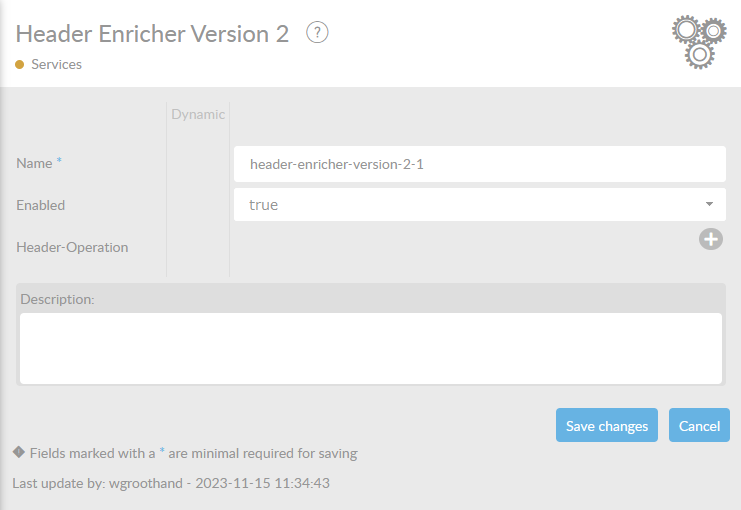
In the table below, you will find an explanation of these properties. All attributes with a '*' are mandatory.
| Attribute | Description |
|---|---|
Name* |
By default, we fill this out with the technical 'tag', followed by a serial number. Changing the name is optional. |
Enabled |
Check this box if you want this service to be enabled. |
Header |
Here, you can change or create properties. By pushing |
Description |
Description of the specific service. This is for documentation purposes. |


It is important to understand that a ConnectMessage has headers on two levels:
- ConnectMessage level
-
Headers that are set on the ConnectMessage itself.
- ConnectMessagePart level
-
Headers that are set on a specific ConnectMessagePart.
The header enricher allows you to add, update or remove headers on both levels. If you want to operate on part level, you need to specify the part name.
2. Header operations
New header values can be static values, copied from other headers or the result of a header operation. Supported operations are:
- Fixed value
-
A fixed value that is set on the header.
- Copy from header
-
The value of another header is copied to the header.
- JSONPath
-
The first match of a JSONPath expression is set on the header.
- XPath
-
The first match of an XPath expression is set on the header.
- Regex
-
The first match of the first capturing group of a regular expression is set on the header.
- UUID
-
A new UUID is generated and set on the header.
- Date-time
-
A date-time timestamp is generated and set on the header.
- Epoch timestamp
-
An epoch timestamp is generated and set on the header. The epoch timestamp is the number of (milli)seconds since 1970-01-01T00:00:00Z.
- Script
-
A JavaScript script is evaluated and the result is set on the header.
In a single header enricher, several such operations can be defined. The order of the operations is important, as the result of one operation can be used as input for the next operation. For example, you can first set a header to a fixed value, and then append the value of another header to it.
2.1. Date-time timestamp
A date-time timestamp is a local date-time timestamp, with an optional offset, formatted according to a chosen predefined format or a custom user-defined format. The following predefined formats are supported:
- ISO_LOCAL_DATE_TIME
-
The ISO local date-time format, such as '2011-12-03T10:15:30'.
- ISO_LOCAL_DATE
-
The ISO local date format, such as '2011-12-03'.
- ISO_LOCAL_TIME
-
The ISO local time format, such as '10:15:30'.
The user-defined format is a string formatted according to the DateTimeFormatter class of Java 8. For example, 'yyyy-MM-dd HH:mm:ss.SSS' will result in a date-time timestamp such as '2011-12-03 10:15:30.123'. Please see the Java 8 documentation for more information.
2.2. Substitution syntax
The fixed, JSONPath, XPath and regex expression can when the Enable Substitution Syntax option is enabled contain substitution syntax. This syntax allows you to use the value of headers and message part payloads in the expression. For example, in the following JSONPath expression:
$.a.jsonpath.expression.:header[a-connect-message-header]
the sub-expression :header[a-connect-message-header] will be substituted with the value of the ConnectMessage header a-connect-message-header.
The syntax the following expressions:
:header[header-name]-
The value of the ConnectMessage header with the given name is used.
:part[part-name]-
The value of the ConnectMessagePart payload with the given name is used. Only payloads of type
TEXTare supported. :partHeader[part-name,header-name]-
The value of the ConnectMessagePart header with the given name in the part with the given name is used.
The substituted value itself can also contain substitution syntax. For example, if the value of the ConnectMessage header a-connect-message-header is :part[a-connect-message-part] the JSONPath expression
$.a.jsonpath.expression.:header[a-connect-message-header]
will be effectively evaluated as
$.a.jsonpath.expression.:part[a-connect-message-part]
To avoid infinite recursion, the substitution syntax is only supports a finite number of levels.
2.3. JavaScript support
The JavaScript script last statement must be an expression that evaluates to the new header value. For example:
var x = 42;
x;
will result in the header value 42.
When using JavaScript, the following variables are available:
messageorconnectmsg-
The ConnectMessage.
headersorproperties-
The ConnectMessage headers.
messageParts-
The ConnectMessage parts.
log-
A logger that can be used to log messages.
For example:
var x = 42;
log.info("The answer is " + x);
x + headers.get("a-connectmessage-header");
will result in the header value 42 with the value of the ConnectMessage header a-connectmessage-header appended. This script will also log the message The answer is 42.
3. Header operation - attributes
| Attribute | Description | ||
|---|---|---|---|
Header Operation |
Should the header be added, updated or deleted? This attribute can have the following values: ADD_OR_UPDATE_HEADER:: Add or update a ConnectMessage(Part) header. DELETE_HEADER:: Delete a ConnectMessage(Part) header. |
||
Target Header Location |
Is the target header a ConnectMessage header or to a ConnectMessagePart header? This attribute can have the following values: CONNECT_MESSAGE_HEADER:: The header to add, update or delete is a ConnectMessage header. CONNECT_MESSAGE_PART_HEADER:: The header to add, update or delete is a ConnectMessagePart header. |
||
Target Header Message Part Name |
The name of the ConnectMessagePart of the target header. |
||
Target Header Name |
The name of the header to add, update or delete. |
||
Update Strategy |
The update strategy to use if the header already exists. This attribute can have the following values:
|
||
Value Specification Type |
The type of value specification to use. This attribute can have the following values:
|
||
Date Time Offset |
The positive or negative offset in time units to add to the current date time value. |
||
Date Time Offset Unit |
The unit of the offset. This attribute can have the following values:
|
||
Date Time Format |
The date time format to use. When using a custom format, use the custom-date-time-format attribute to specify the desired format. This attribute can have the following values:
|
||
Custom Date Time Format |
The custom date time format to use. See the documentation for more information and examples of formats. |
||
Epoch Timestamp Type |
The type of epoch timestamp to use. This attribute can have the following values:
|
||
Fixed Value |
Fixed value to set the header to. |
||
XPath Expression |
The XPath expression to perform. |
||
JSONPath Expression |
The JSONPath expression to perform. |
||
Regex Expression |
The regex expression to perform. Note that if the regex contains one or more capturing groups, the first capturing group match will be used as the resulting header value. Otherwise the entire match will be used as the header value. |
||
Input Message Part Name |
The name of the ConnectMessagePart to use as input for the JSONPath, XPath or regex expression. |
||
Enable Substitution Syntax |
Enable the :header[…], :part[…] and :partHeader[…] notation in the JSONPath, XPath or regex expression. |
||
Reference to script |
A reference to a script that produces the header value. |
||
Header To Copy From Location |
Should the header be copied from a ConnectMessage header or from a ConnectMessagePart header? This attribute can have the following values:
|
||
Header To Copy From Message Part Name |
The name of the ConnectMessagePart of the header to copy the value from. |
||
Header To Copy From |
The name of the header to copy the value from. |