E-Mail Listener
1. Overview
The Mail Listener is used to read from an SMTP destination.
This listener is a Message-driven listener. This means that the arrival of a message on the target emailbox, will activate the consumer. The listeners output is a ConnectMessage.
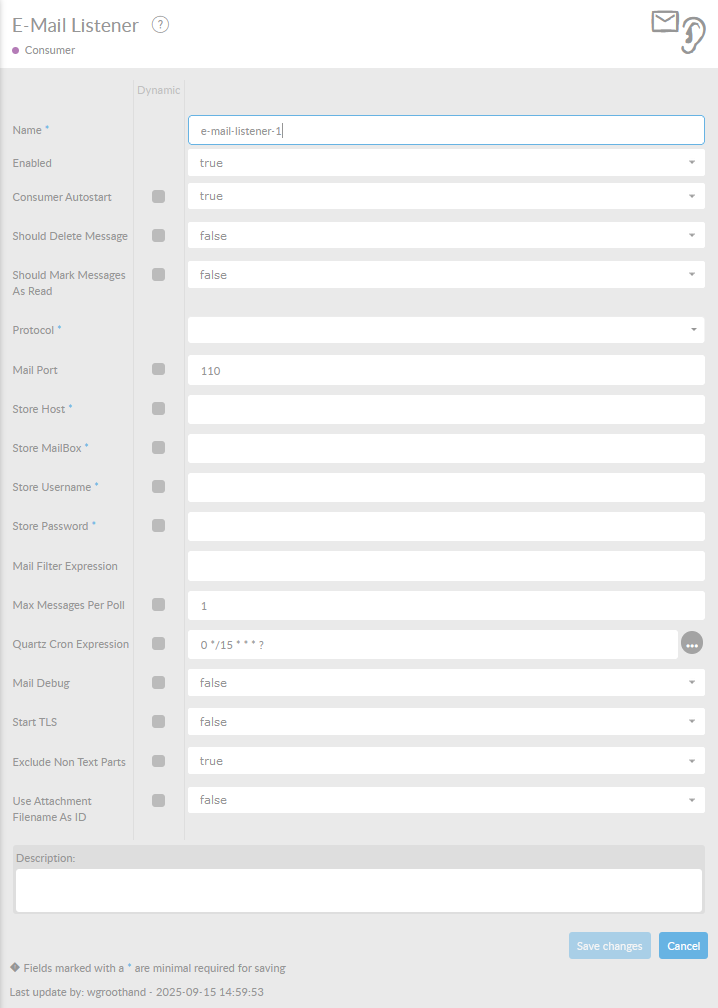
In the table below, you will find an explanation of these properties.
All attributes with a * are mandatory.
| Attribute | Description |
|---|---|
Name* |
By default, we fill this out with the technical tag, followed by a serial number. Changing the name is optional. |
Enabled |
Check this box if you want this consumer to be enabled. |
Consumer Autostart |
Consumer will be started at startup of the interface. |
Should Delete Message |
Set this value on true when you want to delete the message from the emailbox. |
Should Mark Messages As Read |
Set this value on true when you want to set the message as Marked as read . The message will remain in your emailbox. |
Protocol |
Select one of the next protocols: * POP3 * IMAP * POP3S * IMAPS |
POP3 Port |
POP3 Port number. |
IMAP Port |
IMAP Port number. |
Store Host |
Mail server host. |
Store MailBox |
Emailbox to read from. For instance Inbox. |
Store Username |
Username of the selected emailbox. |
Store Password |
Password of the user. |
Mail Filter Expression |
Filter expression to filter mail you want out of the selected emailbox. |
Max Messages |
Maximum amount of messages to read at once. |
Quartz Cron Expression |
Definition of the interval this polling consumer will check for messages. Format (sec) (min) (hour) (day) (month) (year). Watch out! Email providers do not like it when you poll information from the server every 1 second. We noticed that this can lead to a chatty blockade of your emailbox. We strongly advice to set the cron to a minimum of 10 to 15 minutes. This field defaults to 15 minutes |
Mail Debug |
Set this value to True to add debug information to the interfaces log. |
Start TLS |
Set this value to True if you have to read messages securely . |
Exclude Non Text Parts |
Set this value to True to exclude non text parts of the email. |
Use Attachment Filename As ID |
Set this value to True to use attachments' original names as messagepart ids. Otherwise messageparts will be named msgprtX where X is an incremental number up to the number of attachments minus one. |
Description |
Description of the specific consumer. This is for documentation purposes. |
|
Remember to trust the server’s certificate in you truststore if using a secure connection. |