JMS listener
1. Overview
The JMS listener is used to read from a JMS destination.
This listener is a _ message-driven _ listener. This means that the arrival of a message on the destination queue or topic, will activate the consumer. The listener’s output is a ConnectMessage.
|
The ObjectToConnectMessageTransformer will convert the message from the destination to a fitting MessagePart and write it into a new message. If a Progress MultipartMessage is received, a ConnectMessage MultipartMessage will be generated. The JMS headers will be copied to the ConnectMessage headers. |
You can choose between Queues or Topics for the JMS Topology attribute, the screen will adjust accordingly.
2. Queues
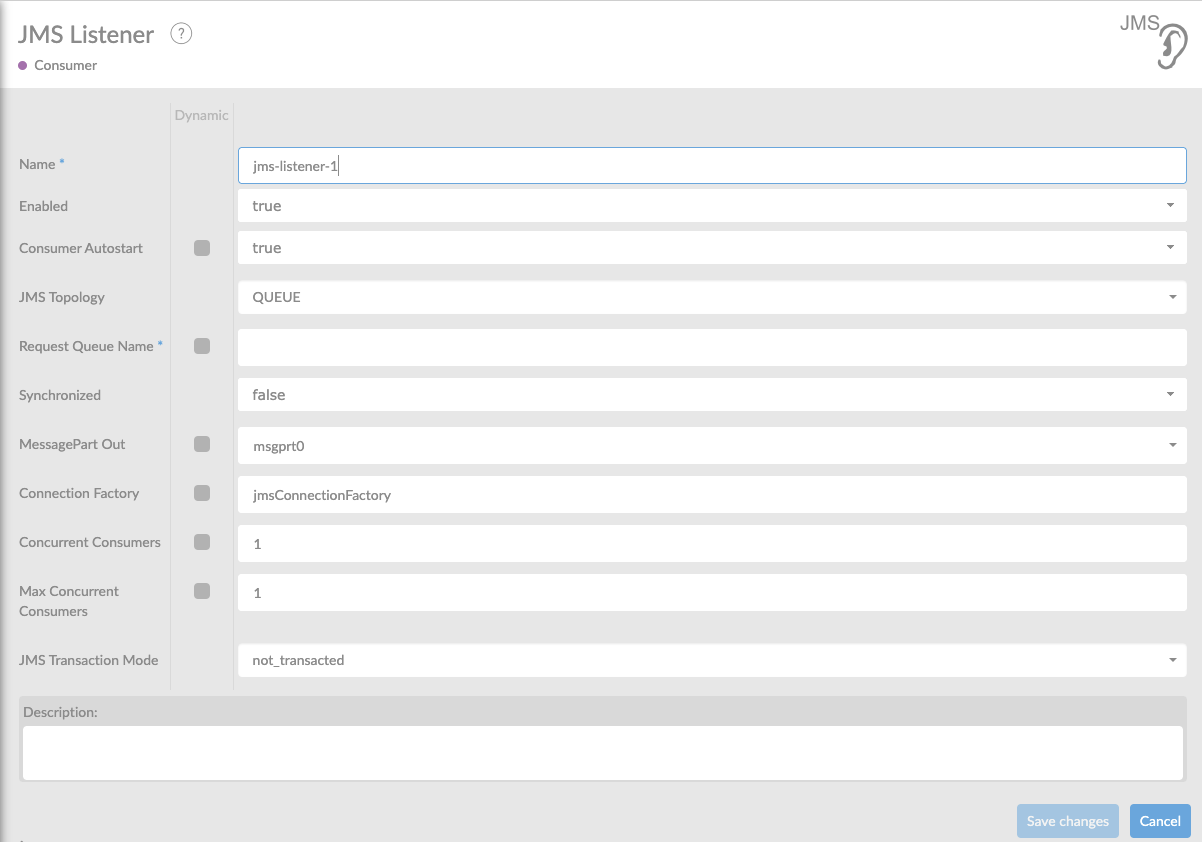
In the table below, you will find an explanation of these properties.
All attributes with a * are mandatory.
All attributes with a '* ' , require at least one of these properties having been set.
| Attribute | Description |
|---|---|
Name* |
By default, we fill this out with the technical tag, followed by a serial number. Changing the name is optional. |
Enabled |
Set this value to true, if you want this consumer to be enabled. |
Consumer Autostart |
Consumer will be started at startup of the interface |
JMS Topology |
Here you can choose between Queue or Topic. The screen will adjust accordingly |
Request Queue Name*** |
Name of queue to receive from. Only one request-destination-ref, request-queue-name OR request-topic-name can be set. |
Reply Queue Name |
Default queue to send reply to if sync=true and no header attribute JMSREPLY_TO. |
Synchronized |
Defines the consumer as request-response(true) or fire-forget(false). The default is false. When the synchronized mode is used, you must use a Message Reply in the Producer. The default setting is 'false', which means it is set to asynchronized. Setting this property to 'true' will make it synchronized. |
Timeout |
Time-out in milliseconds . After time-out has passed response will be sent to JMS Reply To when dealing with a synchronized consumer. |
MessagePart Name |
Name of the MessagePart in a ConnectMessage where the content of the file is being stored. Not applicable when receiving a Progress Multipart. |
Connection Factory |
Reference to the connection factory to use. Default connection factory is named in property connect.connectionfactory.name in connectplaza-agent.properties. The default connection factory is ActiveMQ . |
Concurrent Consumers |
Specify the number of concurrent Consumers to create. The default value is 1. Specifying a higher value for this setting will increase the standard level of scheduled concurrent Consumers at runtime: This is effectively the minimum number of concurrent Consumers which will be scheduled at any given time. This is a static setting; for dynamic scaling, consider specifying the maxConcurrentConsumers" setting instead. Raising the number of concurrent Consumers is recommended in order to scale the consumption of messages coming in from a queue. However, note that any ordering guarantees are lost once multiple Consumers are registered." |
Max Concurrent Consumers |
Specify the maximum number of concurrent Consumers to create. The default value is 1. If this setting is higher than concurrentConsumers", the listener container will dynamically schedule new Consumers at runtime, provided that enough incoming messages are encountered. Once the load goes down again, the number of Consumers will be reduced to the standard level ("concurrentConsumers") again. Raising the number of concurrent Consumers is recommended in order to scale the consumption of messages coming in from a queue. However, note that any ordering quarantees are lost once multiple Consumers are registered." |
JMS Transaction Mode |
Specify which type of JMS Transaction Mode you wish to use. The default is NOT_TRANSACTED. When using FLOW_TRANSACTED the ConnectPlaza flow will commit only when the message is delivered on the Producer and has no further actions, or will be rolled back during any Exception. When using SESSION_TRANSACTED the message must be either committed using the JMS Ack Service or rolled back using the JMS Nack Service. CAUTION: when using the SESSION_TRANSACTED mode it is imperative to always Ack or Nack every messages to avoid blocking threads. |
Description |
Description of the specific consumer. This is for documentation purposes. |
3. Topics
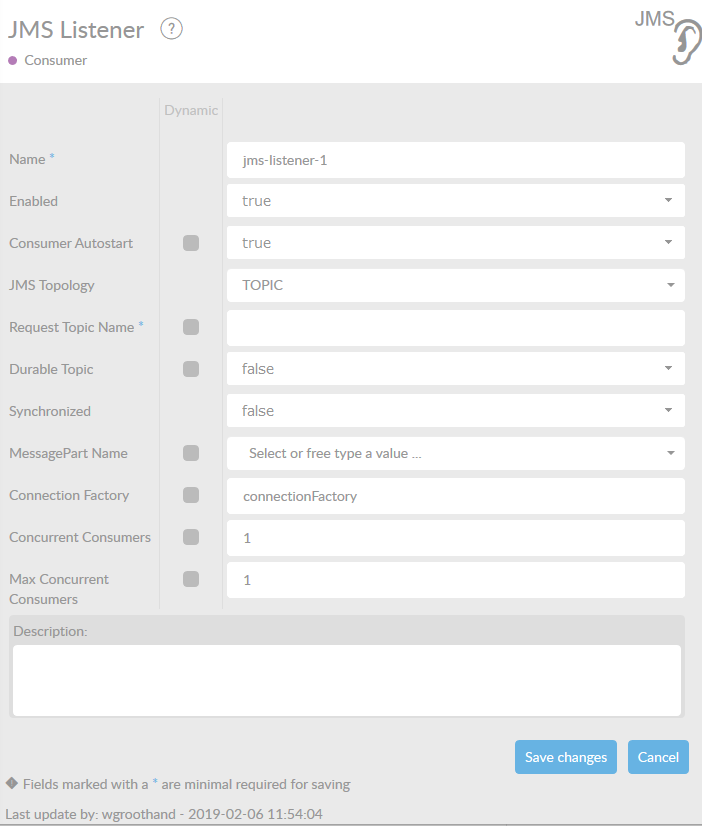
In the table below, you will find an explanation of these properties.
All attributes with a * are mandatory.
All attributes with a '* ' , require at least one of these properties having been set.
| Attribute | Description |
|---|---|
Name* |
By default, we fill this out with the technical tag, followed by a serial number. Changing the name is optional. |
Enabled |
Set this value to true, if you want this consumer to be enabled. |
Consumer Autostart |
Consumer will be started at startup of the interface |
JMS Topology |
Here you can choose between Queue or Topic. The screen will adjust accordingly |
Request Topic Name*** |
Name of topic to receive from. Only one request-destination-ref, request-queue-name OR request-topic-name can be set. |
Reply Topic Name |
Default topic to send reply to if sync=true and no header attribute JMSREPLY_TO. |
Durable Topic |
Only valid if the request-topic-name is set. The topic will be durable if the value is set to true. The default is false. |
Durable Subscription name |
Name of the Subscription in case of a durable subscription. |
Synchronized |
Defines the consumer as request-response(true) or fire-forget(false). The default is false. When the synchronized mode is used, you must use a Message Reply in the Producer. The default setting is 'false', which means it is set to asynchronized. Setting this property to 'true' will make it synchronized. |
Timeout |
Time-out in milliseconds. After time-out has passed response will be sent to JMS Reply To when dealing with a synchronized consumer. |
MessagePart |
Name of the MessagePart in a ConnectMessage where the content of the file is being stored. Not applicable when receiving a Progress Multipart. |
Connection Factory |
Reference to the connection factory to use. Default connection factory is named in property connect.connectionfactory.name in connectplaza-agent.properties. The default connection factory is activeMQ. |
Concurrent Consumers |
Specify the number of concurrent Consumers to create. The default value is 1. Specifying a higher value for this setting will increase the standard level of scheduled concurrent Consumers at runtime: This is effectively the minimum number of concurrent Consumers which will be scheduled at any given time. This is a static setting; for dynamic scaling, consider specifying the maxConcurrentConsumers" setting instead. Raising the number of concurrent Consumers is recommended in order to scale the consumption of messages coming in from a queue. However, note that any ordering guarantees are lost once multiple Consumers are registered." |
Max Concurrent Consumers |
Specify the maximum number of concurrent Consumers to create. The default value is 1. If this setting is higher than concurrentConsumers", the listener container will dynamically schedule new Consumers at runtime, provided that enough incoming messages are encountered. Once the load goes down again, the number of Consumers will be reduced to the standard level ("concurrentConsumers") again. Raising the number of concurrent Consumers is recommended in order to scale the consumption of messages coming in from a queue. However, note that any ordering guarantees are lost once multiple Consumers are registered." |
Description |
Description of the specific consumer. This is for documentation purposes. |
4. Adding a new broker for JMS
When you want to use a new JMS Broker within ConnectPlaza®, you need to create a new connectionfactory with the correct settings for your new JMS Broker. For instance you want to use ActiveMQ as an external Messaging broker. What to do?
Open the file
<connectplaza-install-directory>/context/custom-connection-factories.xml
and add the settings for the ActiveMQ Broker.
<bean id="amqConnectionFactory" class="org.apache.activemq.ActiveMQConnectionFactory">
    <property name="brokerURL">
      <value>tcp://localhost:61616</value>
    </property>
</bean>
Change the default Connection Factory to the ID in this bean, i.e. amqConnectionFactory.
After changing the XML file, restart the ConnectPlaza® Agent.
5. How to use the JMS Acknowledge and JMS Rollback Services
Starting in 5.3.0 the JMS Consumer can be used fully reliable by managing transactions. There essentially two ways to achieve this.
1) Use FLOW_TRANSACTED mode. This will ensure that your JMS message will be automatically acknowledged when the current flows producer has executed its final action. Whenever the current flow encounters and error and error handling is triggered, the JMS Message will be rolled back to the queue.
2) Use SESSION_TRANSACTED mode. This will give you as a user full control over when messages are acknowledged or rolled back. You must (!) choose and place the relevant JMS Acknowledgment service in your interface at the point you wish to acknowledge the message, and / or place the relevant JMS Rollback service in your inteface at the point you with to rollback your message (most likely in a designated error flow). When using SESSION_TRANSACTED the use of JMS Acknowledge / JMS Rollback is manditory (!). If a message in this mode is neither acknowledged or rolledback, it will remain in an incomplete state and the consumers thread will wait indefinitely leading to issues on the long term. While this mode is exceptionally versatile, these requirements have to be met.