MQTT-Sender
1. Overview
MQTT Sender can be used to publish messages to a topic on an MQTT broker.
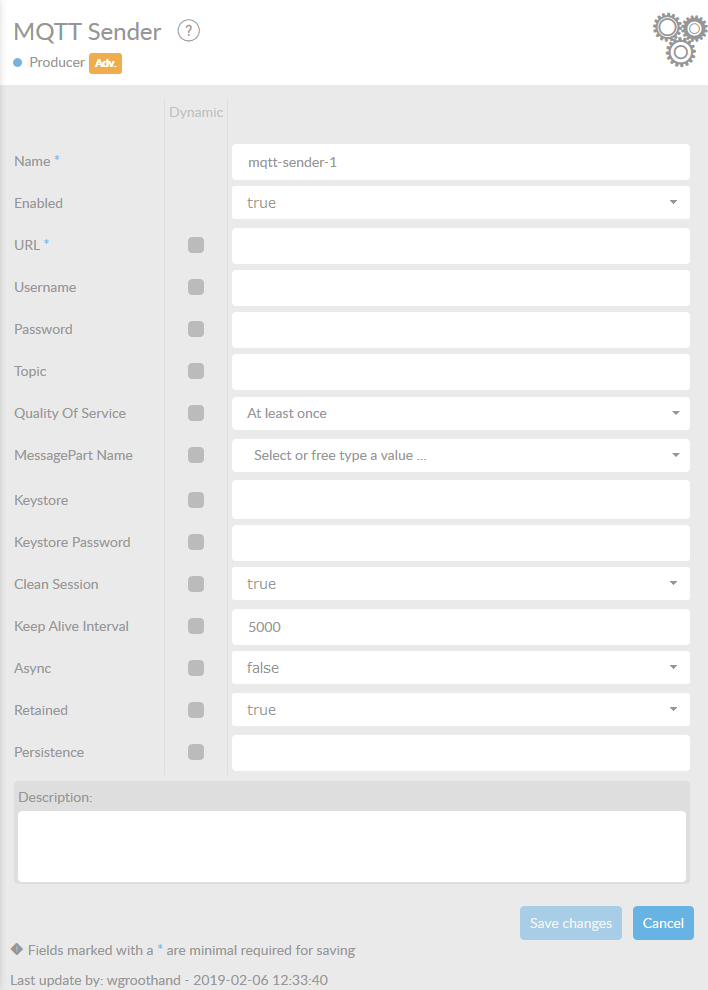
In the table below, you will find an explanation of these properties.
All attributes with a * are mandatory.
| Attribute | Description |
|---|---|
Name* |
Id of the component. |
Enabled |
Set this value to true, if you want this consumer to be enabled. |
URL* |
URL to connect to the broker. The chosen URL determines whether the connection should be encrypted or not. The consumer will use the default ConnectPlaza® truststore. The URL must have the following format: |
Username |
Client username to connect to the broker. |
Password |
Client password to connect to the broker. |
Topic |
The topic to publish to. If no topic is mentioned, the messages will be sent to the topic specified in the mqtt_topic property of the connect message. This means that the topic attribute is not required. You can send topics with one producer to varying topics by setting the mqtt_topic property with a header enricher. |
Quality of Service |
A comma delimited list of QoS values. Can be asingle value that is applied to all topics, or a value for each topic (in which case the lists must be the same length). Default: 0. |
MessagePart |
Name of the MessagePart in a ConnectMessage where the content of the message is being stored. |
Timeout |
Time-out in milliseconds. It only applies if the channel might block. |
Keystore |
Name of the keystore file to use for client authentication. If the keystore file is not on the classpath the name should be preceded by file:. Default: no keystore will be used. |
Keystore Password |
Password of the keystore for client authentication. |
Clean Session |
Sets whether the client and server should remember state across restarts and reconnects. |
Keep-alive Interval |
The keep alive interval specifies the maximum amount of time in seconds that broker and client can be connected without sending a message. |
Async |
When true, the caller will not block waiting for delivery confirmation when a message is sent. Default:false. |
Retained |
When true, the broker will store the last retained message on a topic so that new subscribers receive the last message immediately after subscribing. Default:false. |
Persistence |
Path to the directory to use for persistence. Default: no persistence. |
Description |
Description of the specific consumer. This is for documentation purposes. |
2. Enable SSL
When you enable SSL, you need to add some extra information. This will look like this:
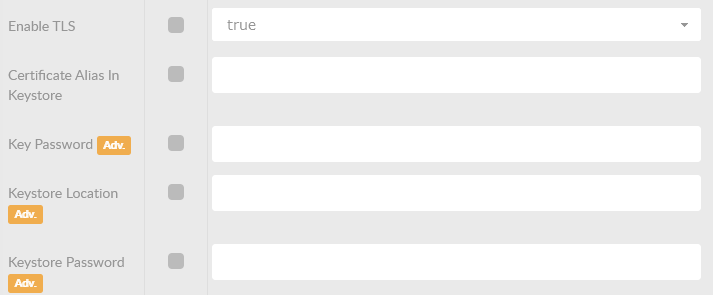
| Attribute | Description |
|---|---|
Certificate Alias in Keystore |
Set the certificate alias for the selected certificate. Should exist in defined keystore. |
Key Password |
Password for the certificate key. |
Keystore Location |
The location of the keystore. Should be a path to the keystore JKS file. |
Keystore Password |
Password of the keystore. |