JMS sender
1. Overview
JMS sender is used to send the message to a JMS destination. This destination can be a queue or a topic in a JMS environment. The connection factory determines which JMS environment is used. By default a connection factory is used, which is included as Spring bean with the name connectionFactory* . If another connection factory is needed, the attribute connection factory has to be used.
|
REMEMBER: You cannot use a JSM Sender when you are using an HTTP Listener. If you are using an HTTP Listener, you have to use a Message Reply to let the HTTP Listener know the job is done. So if that is the case, use the JMS Outbound gateway in services. |
If the destination, destination-ref., queue-name or topic-name attribute are not the JMSReplyTo (jms_replyTo) property is used as destination. This property is normally set by a jms-listener.
The output of the producer is a JMS Message.
The ConnectMessage headers are copied to the JMS headers.
2. Having selected QUEUE topology
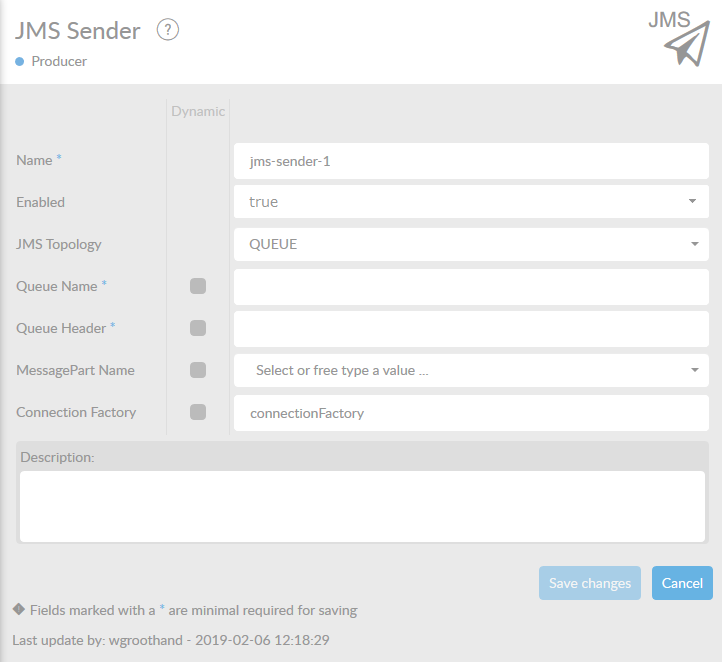
In the table below, you will find an explanation of these properties.
All attributes with a * are mandatory.
All attributes with a '*' , require at least one of these properties having been set.
| Attribute | Description |
|---|---|
Name* |
By default, we fill this out with the technical tag, followed by a serial number. Changing the name is optional. |
Enabled |
Set this valuet to true, if you want this producer to be enabled. |
JMS Topology |
Specify which type of JMS topology you want to use. You can choose between QUEUE and TOPIC. The default is QUEUE. |
Queue Name*** |
Name of queue to send to. Only one destination-ref, queue-name OR topic-name can be set. |
Queue Header |
Name of the header that contains the queue name to send to. Only one query-header or topic-header can be set. |
MessagePart |
Name of the MessagePart in a ConnectMessage where the content of the file is being stored. |
Connection Factory |
Reference to the connection factory to use. Default connection factory is named in property connect.connectionfactory.name in connectplaza-agent.properties. The default connection factory is ActiveMQ. |
Description |
Description of the specific producer. This is for documentation purposes. |
3. Having selected TOPIC topology
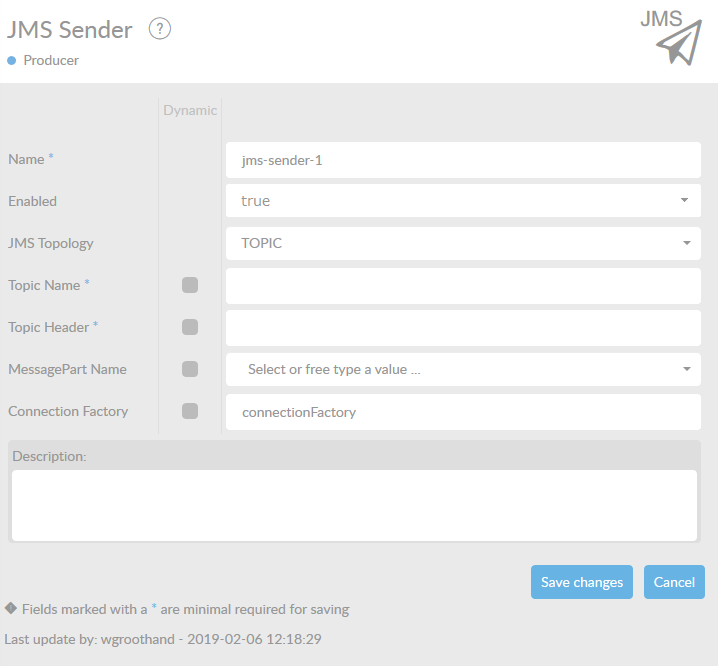
| Attribute | Description |
|---|---|
Name* |
By default, we fill this out with the technical tag, followed by a serial number. Changing the name is optional. |
Enabled |
Set this valuet to true, if you want this producer to be enabled. |
JMS Topology |
Specify which type of JMS topology you want to use. You can choose between QUEUE and TOPIC. The default is QUEUE. |
Topic Name*** |
Name of topic to send to. Only one destination-ref, queue-name or topic-name can be set. |
Topic Header |
Name of the header that contains the Topic name to send to. Only one query-header or topic-header can be set. |
MessagePart |
Name of the MessagePart in a ConnectMessage where the content of the file is being stored. |
Connection Factory |
Reference to the connection factory to use. Default connection factory is named in property connect.connectionfactory.name in connectplaza-agent.properties. The default connection factory is activeMQ. |
Description |
Description of the specific producer. This is for documentation purposes. |