Webservice gateway
1. Overview
This service is a gateway to a webservice gateway, this means that the service performs a call-out to the defined webservice and waits for the response.
The content of _ MessagePart-In _ is sent to the defined URI and the defined SOAP-action. The result of the webservice is put in MessagePart-Out.
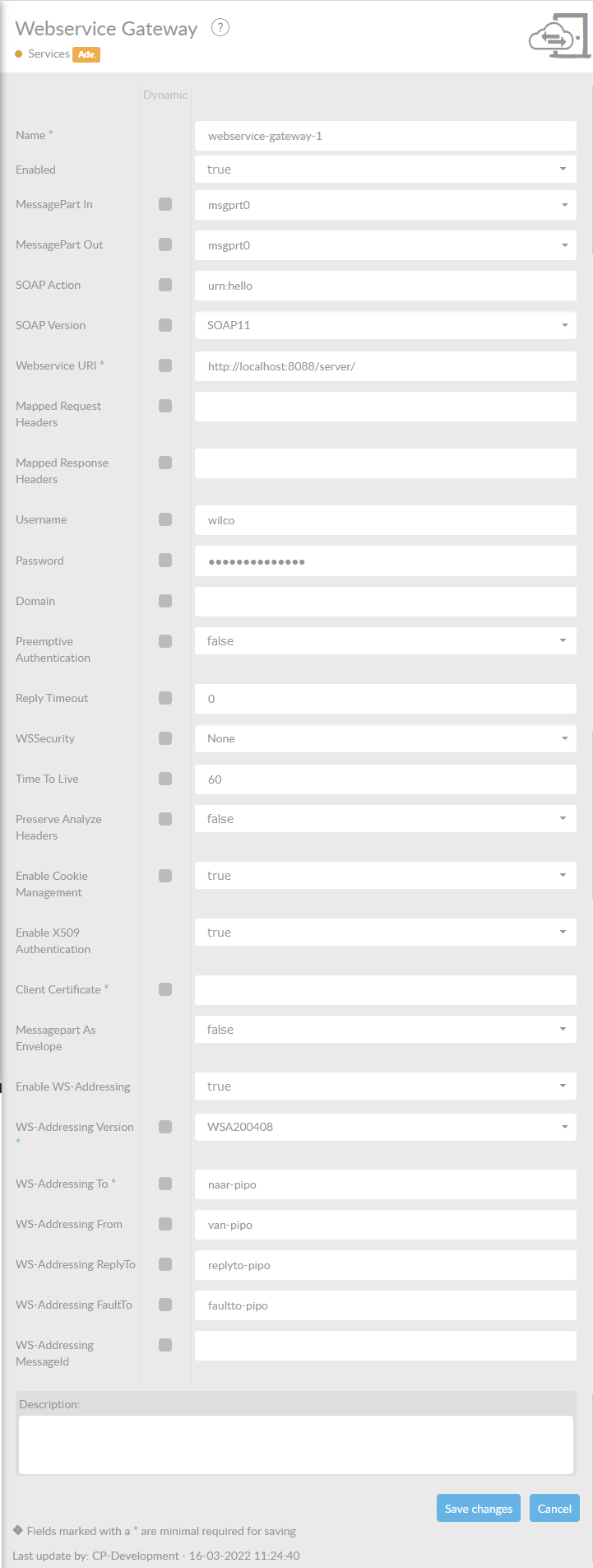
In the table below, you will find an explanation of these properties.
All attributes with a * are mandatory.
| Attribute | Description |
|---|---|
Name* |
By default, we fill this out with the technical tag, followed by a serial number. Changing the name is optional. |
Enabled |
Check this box if you want this service to be enabled. |
MessagePart-In |
Name of the MessagePart in a ConnectMessage where the content of the file is being stored. |
MessagePart-Out |
Name of the MessagePart in a ConnectMessage where the content of the file is being stored. When using ' ALL' the ConnectMessage will be sent out as a SOAP Multipart message. |
SOAP Action |
SOAP action URI of SOAP operation to be called. Will set the SOAPAction header. |
SOAP Version |
Specify which SOAP version to use when sending requests. Choose either SOAP11 or SOAP12. Defaults to SOAP11. |
SOAP Fault Handling |
Set to true in order to have any SOAP Fault message, sent by the server, to be returned as messagepart-out. When set to true, the SOAP Fault will raise an Exception. Default is true. |
Webservice URI* |
Location URI to call webservice. |
Mapped Request Headers |
A comma separated list of headers to be mapped from the ConnectMessage to the HTTP request. |
Mapped Response Headers |
A comma separated list of headers to be mapped from HTTP response to the ConnectMessage. |
Custom MessageSender Bean Reference |
Specify custom MessageSender bean reference. Advanced use only. |
Username |
Authentication username. |
Password |
Authentication password. |
Domain |
Authentication domain (for NTLM support). |
Preemptive Authentication |
Specify whether to use Preemptive Authentication. The default is false. |
Reply Timeout |
Time in milliseconds to wait before time-out. |
WSSecurity |
Specify which security method should be used in the soap:Header element when using credentials. Can be set to None,PasswordText, PasswordDigest,Encrypt, Sign, Encrypt and Sign. When setting to Encrypt, Sign or Encrypt and Sign you will need to specify a WSS Properties File. |
Time to live |
Expiration time fot the WS Security timestamp inseconds. Defaults to 60 seconds |
Preserve Analyze Headers |
Switch to enable or disable preservation of Analyze headers. The default is false. |
Enable Cookie Management |
Enables or disables the cookie management settings in the HTTP client. When set to disabled, cookie headers will no longer be managed automatically |
Enable X509 Authentication |
Enables or disables X509 authentication. When set to enabled you must provide an alias to an existing private key in you keystore for authentication. |
Client Certificate* |
When using X509 authentication. Specify which client certificat to use vor X509 authentication. You should provide an alias to an existing private key in your keystore for authentication. |
Messagepart as Envelope |
Enable to send messagepart as SOAP envelope. This will assume the user has provided a complete SOAP envelope in the dsignated messagepart. |
Enable WS-Addressing |
Enables WS-Addressing headers for this component |
Enable TLS Verification |
Validates the certificate chain a server presents against the ConnectPlaza truststore and the trust anchors of the JVM. Disable this only to reach an endpoint whose certificate cannot be validated, such as a self-signed one: the connection stays encrypted, but the server is no longer authenticated and the traffic can be intercepted. Defaults to true.Advanced |
WS-Addressing Version* |
Specify WS-Addressing version |
WS-Addressing To* |
Specify WS-Addressing To. Must be formatted as an URI. + I.E: http://business456.example/client1 |
WS-Addressing From |
Specify WS-Addressing From. Must be formatted as an URI. + I.E: http://business456.example/client1 |
WS-Addressing ReplyTo |
Specify WS-Addressing Reply To. Must be formatted as an URI. + I.E: http://business456.example/client1 |
WS-Addressing FaultTo |
Specify WS-Addressing Fault To. Must be formatted as an URI. + I.E: http://business456.example/client1 |
WS-Addressing MessageId |
Specify WS-Addressing MessageID. Must be formatted as an URI. When left blank a UUID will be generated. |
Description |
Description of the specific service. This is for documentation purposes. |
Example WSS Properties
wss.securement.actions=Signature|Encryption or both comma separated.
wss.securement.password=password that correspond with your wss keystore.
wss.securement.keyidentifier=DirectReference
wss.securement.keystore.location=specify wss keystore containing Private Key for Signature
wss.securement.keystore.password=specify wss keystore password
wss.securement.keystore.type=JKS
wss.securement.keystore.keyalias=specify keystore alias for Private Key.
wss.securement.truststore.location=specify wss truststore containing Public Key for Encryption
wss.securement.truststore.password=specify wss truststore password
wss.securement.truststore.type=JKS
wss.securement.truststore.alias=specify alias for Public Key.
wss.securement.encryption.user=specify user/alias for Encryption. Should correspond to Key alias.
wss.securement.signature.user=specify user/alias for Signature. Should correspond to Key alias.
wss.securement.signature.parts=specify QName for what Signature parts.
Example: {Element}\{http://schemas.xmlsoap.org/soap/envelope/}Body for Soap:Body.
wss.securement.encryption.parts=specify QName for what Encryption parts.
Example: {Element}\{http://schemas.xmlsoap.org/soap/envelope/}Body for Soap:Body.
wss.securement.encryptionsym.algorithm=Specify encryption algorithm.
For example: //www.w3.org/2001/04/xmlenc#tripledes-cbc for 3DES-CBD
wss.securement.signature.algorithm=Specify signature algorithm: For example: RSA
wss.validation.actions=Specify validation actions like Signature|Encryption|NoSecurity
wss.securement.enable.validation=Specify true to enable validation.