XPath Filter
1. Overview
The XPath Filter service can filter a message using an XPath expression. The XPath expression returns a boolean value. Based on this value and the Inverse value, the message is either let through or sent to the discard flow.
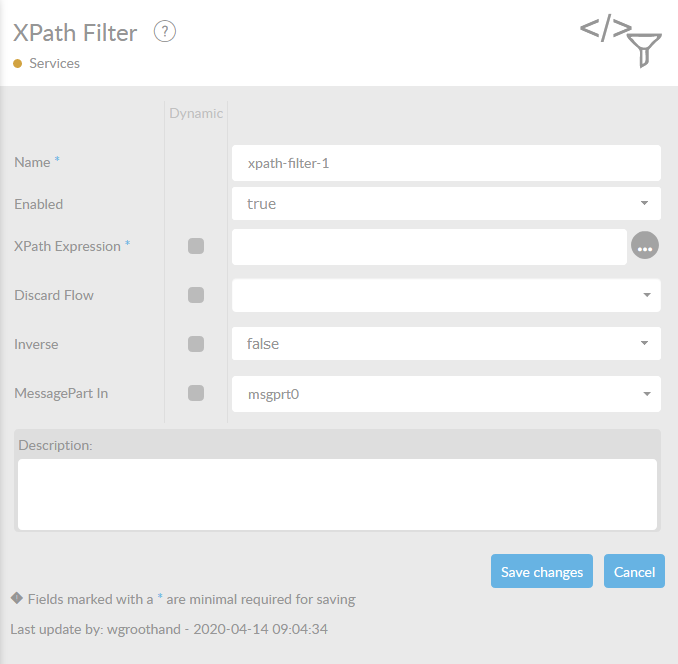
In the table below, you will find an explanation of these properties.
All attributes with a * are mandatory.
| Attribute | Description |
|---|---|
Name* |
By default, we fill this out with the technical tag, followed by a serial number. Changing the name is optional. |
Enabled |
Set this value to true, if you want this service to be enabled. |
XPath Expression* |
The XPath Expression you want to run on the messages you want to have filtered. |
Discard Flow |
The flow the message is routed to if the result of XPath Expression is ' false' . By default these messages are deleted. |
Inverse |
Here, you can choose (' true ' or ' false ') whether the result of the XPath Expression has to be inverted. By default this is set to ' false' . |
MessagePart |
The name of the MessagePart , which will be used as input. The default value is msgprt0. Only use this when you are in fact using different names and/or MessageParts. |
When you select the  behind the field XPath Expression, you will enter an XPath Tester program.
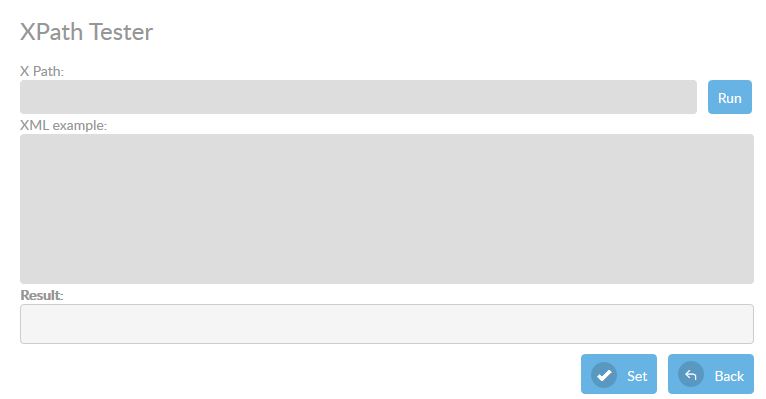
You can enter an XPATH expression and an XML example. When you press the  button the expression will be performed on the given XML File. The result will bereturned in the result field.
|
Please read the extra information about XPATH expressions in XPATH expressions with namespaces |