Amazon SQS service
1. Overview
This service connects a flow to an Amazon Simple Queue Service (SQS) queue. It is one component with three actions. You choose the action in the Action attribute:
-
SEND puts the content of the MessagePart In on the queue.
-
RECEIVE reads one message from the queue and puts its body in the MessagePart Out. It does not remove the message.
-
DELETE removes a message you have already received.
You place it in the Services section of a flow, like any other service. One component performs one action, so a flow that receives a message and then removes it from the queue uses two Amazon SQS services: the first set to RECEIVE and the last set to DELETE.
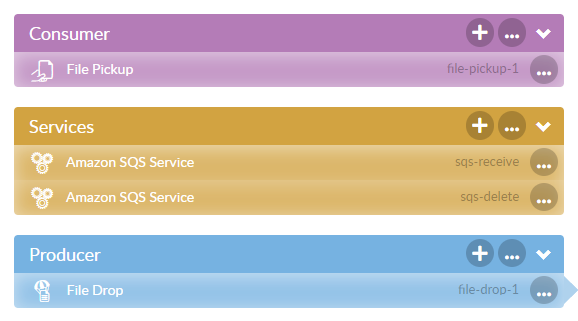
With SEND and DELETE the service calls Amazon and then passes the ConnectMessage to the next component. The content it read from the MessagePart In is written to the MessagePart Out, which changes nothing while both names are the same, as they are by default.
|
Use this service when the flow itself decides at which point to use the queue. If you want the queue to start the flow, use the Amazon SQS listener, which checks the queue on a schedule. |
2. Attributes
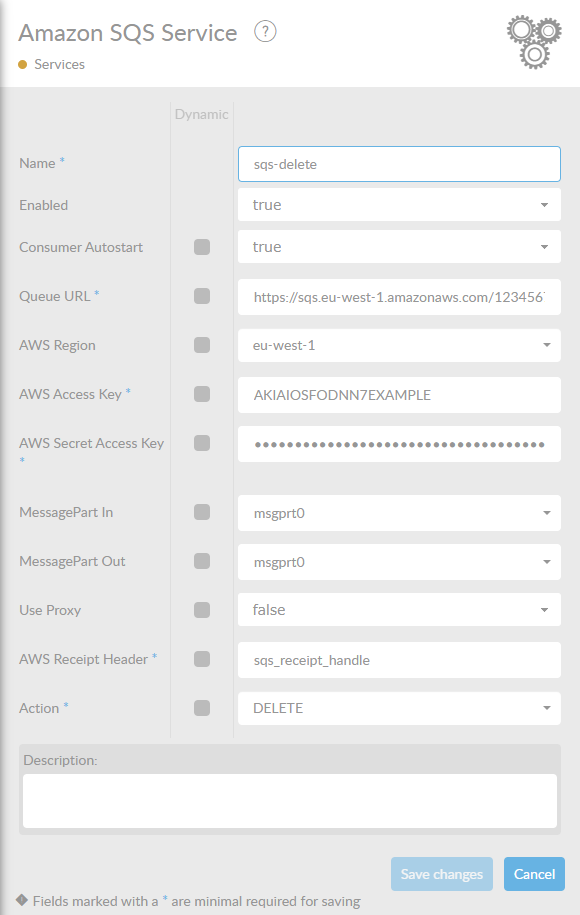
In the table below, you will find an explanation of these properties. All attributes with a * are mandatory.
|
|
3. Sending a message
With Action set to SEND, the service reads the MessagePart In and sends its content as the body of a new message on the queue. The service accepts text, an XML document and raw bytes. Any other content is logged as an error and the call to Amazon is still made, without a body, so the flow ends in error.
The queue sends nothing back, so the ConnectMessage that arrived is passed on unchanged. The identifier that Amazon gives the new message is written to the agent log, not to a header.
4. Receiving a message
With Action set to RECEIVE, the service reads one message and puts its body in the MessagePart Out. It waits up to 10 seconds for a message to appear. That wait is fixed and is not on the form, and your flow always receives one message.
The service adds these headers to the ConnectMessage:
| Header | Description |
|---|---|
|
The identifier Amazon gave the message. |
|
The receipt handle. You need it to delete the message afterwards. |
|
The service expects a message to be there. If the queue is still empty after those 10 seconds, the service has nothing to return and the flow ends in error. Use this action only when you already know a message is waiting. If you want the queue to drive the flow, use the Amazon SQS listener. |
5. Deleting a message
Receiving a message does not remove it from the queue. Amazon only hides it for the length of the queue’s visibility timeout, and then offers it again to any consumer. To take the message off the queue for good, end the flow with an Amazon SQS service whose Action is DELETE.
The delete call identifies the message by its receipt handle. The service reads that handle from the header you name in AWS Receipt Header. The header has to be on the message: when it is missing, the service cannot delete anything and the flow ends in error. If the message was fetched by the RECEIVE action or by the Amazon SQS listener, the default sqs_receipt_handle is already the right header.
|
Amazon gives you a new receipt handle every time it hands out the same message. Delete the message while the visibility timeout of that delivery is still running. If the flow takes longer, the message becomes visible again, the old handle may no longer delete it, and the message starts the flow a second time. |