AI Agent Service
1. Overview
The new AI Agent Service component sends a prompt to an AI chat model — OpenAI or Anthropic — and stores the reply in a message part, so a model’s answer, classification or transformation can be used as a normal flow step. The System Prompt and User Prompt can contain placeholders that are filled from the message itself: each Input Mapping binds a message part to a placeholder, either the whole part or a single value selected from it with a JSONPath, XPath or regular expression. The model, API key, response timeout and a cap on the length of the reply (Max Response Tokens) are configurable per component.
The service connects to the AI Chat model and requires a valid API key to work. You may provide a System prompt and a User prompt. This is to instruct the AI on what to do and how to handle your request. You can use the Input-Mapping to map incoming Message Part(s) to the various messages for the chatmodel, either directly or using expressions. The response from the AI will be placed into the MessagePart out messagepart.
2. Input Mapping
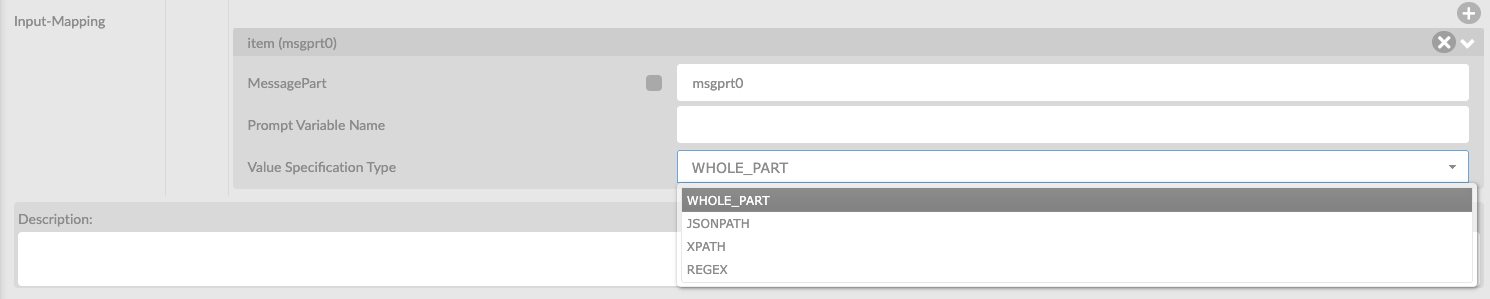
Input mapping is done by adding Input Mapping lines to the service, by clicking on the plus sign. This will allow you to specify how you want to map incoming messageparts onto the chat. There are several options:
Attribute |
Description |
MessagePart |
Specify the messagepart in you wish to map |
Prompt variable name |
Define a variable that can be used in your Prompt message(s) |
Value Specification Type |
You can specify on how you want populate the Prompt Variable based on the input message. Options are: WHOLE_PART - The entire contents op your message JSONPATH - Using a JsonPath expression to retrieve data XPATH - Using an XPath expression to retrieve data REGEX - Using a Regex expression to retrieve data |
(JSON/XPATH/REGEX) Expression |
Here you can specify your designated expression |
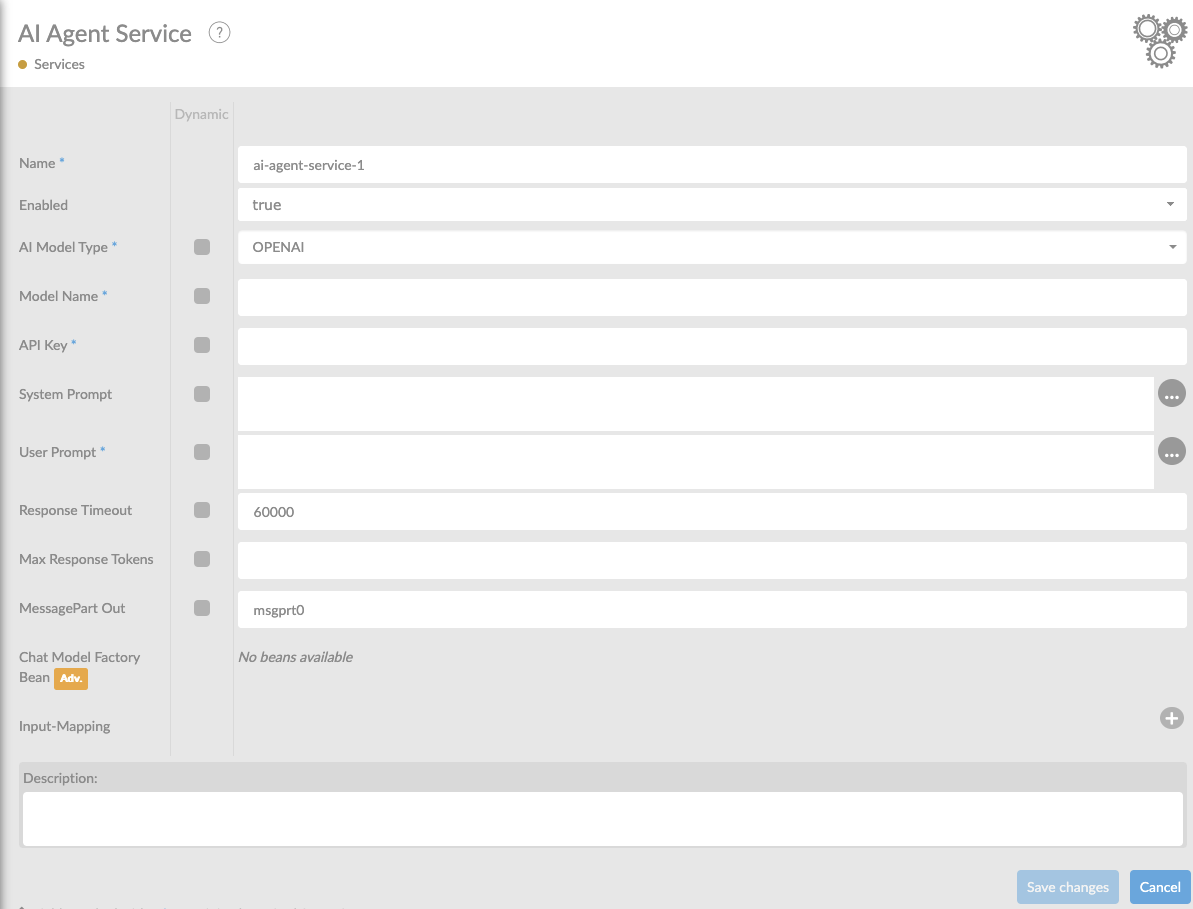
In the table below, you will find an explanation of these properties.
All attributes with a * are mandatory.
| Attribute | Description |
|---|---|
Name* |
By default, we fill this out with the technical tag, followed by a serial number. Changing the name is optional. |
Enabled |
Set this value to true, if you want this service to be enabled at startup |
AI Model Type |
The AI provider to send the prompt to. Choose OPENAI or ANTHROPIC. |
Model Name |
Specify the model you wish you use such as gpt-4.1-mini for OPENAI or claude-sonnet-4.6 for ANTHROPIC. Please refer to the available models in your subscription. |
API Key |
The API key for the selected provider. |
System Prompt |
Optional standing instructions for the model. Supports |
User Prompt |
The prompt sent to the model. Every |
Response Timeout |
Time in milliseconds to wait for the model’s reply. |
Max Response Tokens |
SUpper limit on the length of the model’s reply, counted in tokens (about 3/4 of a word each); the prompt does not count towards it. A reply that reaches the limit is cut off mid-sentence, so raise this when answers come back incomplete. Leave empty to use the provider’s own default: OpenAI then lets the model answer up to its maximum, Anthropic stops at 1024 tokens. |
MessagePart Out |
Name of the message part the model’s reply is written to. An existing part with this name is overwritten. |
Input Mapping |
Input mapping specification. See Input Mapping |
Description |
Description of the specific service. This is for documentation purposes. |
3. Advanced options
| Attribute | Description |
|---|---|
Chat Model Factory Bean |
Here, you can choose an existing Chat Model Factory Bean. The Bean needs to be known within the corresponding Interface in the Interface Overview and must be an implementation of the Lang4J ChatModelFactory |
4. Example
An example on how to use the AI Agent Service. Let’s say you want to integrate AI functionality into your flow that handles a certain question, based on input from your message and produces an output.
User Prompt: How much does a {{fruit}} cost in {{city}}?
In this User Prompt you state the question on how much a certain fruit costs in a certain city. In order to populate this question you can use the input mapping using this example message in msgprt0:
{ "city": "Barcelona", "id": 53425234, "secret": "whatever", "fruit": "banana", }
You can use the following input mappings:
Key |
Value |
Mapping |
1 |
MessagePart |
msgprt0 |
Variable Name |
fruit |
Value specification type |
JSONPATH |
Expression |
$.fruit |
Mapping |
2 |
MessagePart |
msgprt0 |
Variable Name |
city |
Value specification type |
JSONPATH |
Expression |
$.city |
This should yield a response with information about the price of a banana in Barcelona.