Amazon SQS listener
1. Overview
This listener watches an Amazon Simple Queue Service (SQS) queue and starts the flow for the messages it finds there. It checks the queue on a schedule you set with a cron expression, so the queue drives the flow.
The body of the message becomes the content of the MessagePart Name you configure, and the listener adds two headers that identify the message.
|
The listener reads messages. It does not remove them. Amazon hides a received message for the length of the queue’s visibility timeout and then offers it again, so the same message starts your flow a second time unless something deletes it. End the flow with an Amazon SQS service whose Action is DELETE. |
2. Attributes
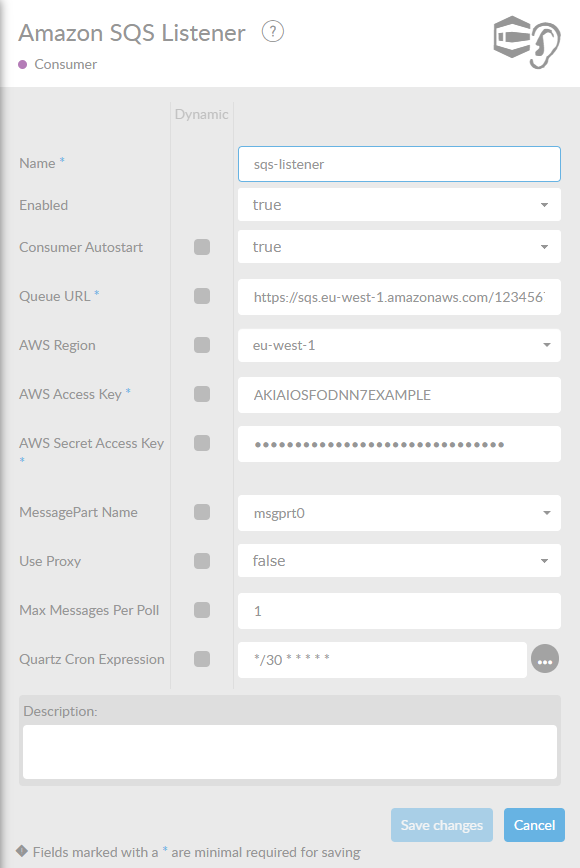
In the table below, you will find an explanation of these properties. All attributes with a * are mandatory.
|
|
3. What one poll does
On every tick of the cron expression the listener asks the queue for messages and waits up to 10 seconds for one to appear. That wait is fixed and is not on the form.
If the queue is empty when the wait is over, nothing happens: no flow is started and nothing is logged as an error. This is the normal state of an idle queue.
For every message it receives, the listener builds a ConnectMessage with the message body in the MessagePart Name and these headers:
| Header | Description |
|---|---|
|
The identifier Amazon gave the message. |
|
The receipt handle. You need it to delete the message afterwards. |
|
Leave Max Messages Per Poll at 1. With a higher value the flow receives all the messages of one poll at once instead of one flow run per message, and the components after the listener cannot read that: the messages are taken from the queue, nothing processes them, and they come back after the visibility timeout. A value below 1 is worse, because the listener then reads nothing at all. |
4. Deleting what you have read
A flow started by this listener has to end by removing the message it just handled. Add an Amazon SQS service, set its Action to DELETE, and leave its AWS Receipt Header at sqs_receipt_handle, which is the header this listener writes.
If the flow does not delete the message, it becomes visible again after the visibility timeout and the flow runs a second time with the same content. Amazon reports no error when this happens, so check the DELETE service first whenever a flow appears to run twice.